bezier.triangle module
Helper for Bézier Triangles.
- class bezier.triangle.Triangle(nodes, degree, *, copy=True, verify=True)
Bases:
BaseRepresents a Bézier triangle.
We define a Bézier triangle as a mapping from the unit simplex in \(\mathbf{R}^2\) (i.e. the unit triangle) onto a triangle in an arbitrary dimension. We use barycentric coordinates
\[\lambda_1 = 1 - s - t, \lambda_2 = s, \lambda_3 = t\]for points in the unit triangle \(\left\{(s, t) \mid 0 \leq s, t, s + t \leq 1\right\}\):
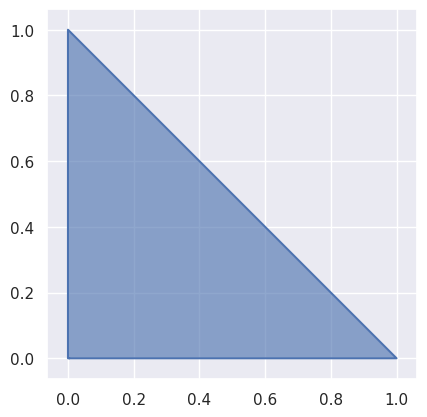
As with curves, using these weights we get convex combinations of points \(v_{i, j, k}\) in some vector space:
\[B\left(\lambda_1, \lambda_2, \lambda_3\right) = \sum_{i + j + k = d} \binom{d}{i \, j \, k} \lambda_1^i \lambda_2^j \lambda_3^k \cdot v_{i, j, k}\]Note
We assume the nodes are ordered from left-to-right and from bottom-to-top. So for example, the linear triangle:
(0,0,1)

(1,0,0)  (0,1,0)
is ordered as
\[\left[\begin{array}{c c c} v_{1,0,0} & v_{0,1,0} & v_{0,0,1} \end{array}\right]\]the quadratic triangle:
(0,0,2)

(1,0,1)  (0,1,1)

(2,0,0)  (1,1,0)  (0,2,0)
is ordered as
\[\left[\begin{array}{c c c c c c} v_{2,0,0} & v_{1,1,0} & v_{0,2,0} & v_{1,0,1} & v_{0,1,1} & v_{0,0,2} \end{array}\right]\]the cubic triangle:
(0,0,3)

(1,0,2)  (0,1,2)

(2,0,1)  (1,1,1)  (0,2,1)

(3,0,0)  (2,1,0)  (1,2,0)  (0,3,0)
is ordered as
\[\left[\begin{array}{c c c c c c c c c c} v_{3,0,0} & v_{2,1,0} & v_{1,2,0} & v_{0,3,0} & v_{2,0,1} & v_{1,1,1} & v_{0,2,1} & v_{1,0,2} & v_{0,1,2} & v_{0,0,3} \end{array}\right]\]and so on.
The index formula
\[j + \frac{k}{2} \left(2 (i + j) + k + 3\right)\]can be used to map a triple \((i, j, k)\) onto the corresponding linear index, but it is not particularly insightful or useful.
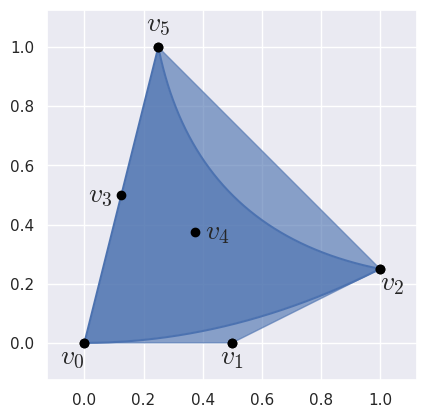
>>> import bezier
>>> import numpy as np
>>> nodes = np.asfortranarray([
...     [0.0, 0.5, 1.0 , 0.125, 0.375, 0.25],
...     [0.0, 0.0, 0.25, 0.5  , 0.375, 1.0 ],
... ])
>>> triangle = bezier.Triangle(nodes, degree=2)
>>> triangle
<Triangle (degree=2, dimension=2)>
- Parameters:
nodes (
SequenceSequencenumbers.Number) – The nodes in the triangle. Must be convertible to a 2D NumPy array of floating point values, where the columns represent each node while the rows are the dimension of the ambient space.degree (int) – The degree of the triangle. This is assumed to correctly correspond to the number of
nodes. Usefrom_nodes()if the degree has not yet been computed.copy (bool) – Flag indicating if the nodes should be copied before being stored. Defaults to
Truesince callers may freely mutatenodesafter passing in.verify (bool) – Flag indicating if the degree should be verified against the number of nodes. Defaults to
True.
- classmethod from_nodes(nodes, copy=True)
Create a
Trianglefrom nodes.Computes the
degreebased on the shape ofnodes.- Parameters:
nodes (
SequenceSequencenumbers.Number) – The nodes in the triangle. Must be convertible to a 2D NumPy array of floating point values, where the columns represent each node while the rows are the dimension of the ambient space.copy (bool) – Flag indicating if the nodes should be copied before being stored. Defaults to
Truesince callers may freely mutatenodesafter passing in.
- Returns:
The constructed triangle.
- Return type:
- property area
The area of the current triangle.
For triangles in \(\mathbf{R}^2\), this computes the area via Green’s theorem. Using the vector field \(\mathbf{F} = \left[-y, x\right]^T\), since \(\partial_x(x) - \partial_y(-y) = 2\) Green’s theorem says twice the area is equal to
\[\int_{B\left(\mathcal{U}\right)} 2 \, d\mathbf{x} = \int_{\partial B\left(\mathcal{U}\right)} -y \, dx + x \, dy.\]This relies on the assumption that the current triangle is valid, which implies that the image of the unit triangle under the Bézier map — \(B\left(\mathcal{U}\right)\) — has the edges of the triangle as its boundary.
Note that for a given edge \(C(r)\) with control points \(x_j, y_j\), the integral can be simplified:
\[\int_C -y \, dx + x \, dy = \int_0^1 (x y' - y x') \, dr = \sum_{i < j} (x_i y_j - y_i x_j) \int_0^1 b_{i, d} b'_{j, d} \, dr\]where \(b_{i, d}, b_{j, d}\) are Bernstein basis polynomials.
- Returns:
The area of the current triangle.
- Return type:
- Raises:
NotImplementedError – If the current triangle isn’t in \(\mathbf{R}^2\).
- property edges
The edges of the triangle.
>>> nodes = np.asfortranarray([
...     [0.0,  0.5   , 1.0, 0.1875, 0.625, 0.0],
...     [0.0, -0.1875, 0.0, 0.5   , 0.625, 1.0],
... ])
>>> triangle = bezier.Triangle(nodes, degree=2)
>>> edge1, _, _ = triangle.edges
>>> edge1
<Curve (degree=2, dimension=2)>
>>> edge1.nodes
array([[ 0. ,  0.5   , 1. ],
       [ 0. , -0.1875, 0. ]])
- evaluate_barycentric(lambda1, lambda2, lambda3, verify=True)
Compute a point on the triangle.
Evaluates \(B\left(\lambda_1, \lambda_2, \lambda_3\right)\).
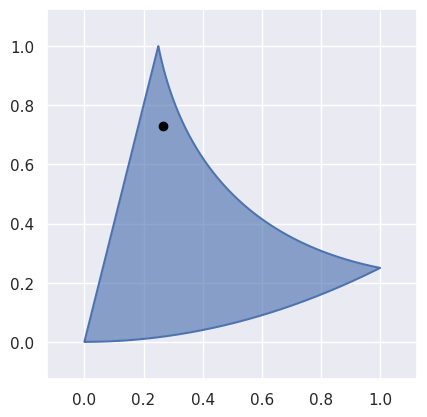
>>> nodes = np.asfortranarray([
...     [0.0, 0.5, 1.0 , 0.125, 0.375, 0.25],
...     [0.0, 0.0, 0.25, 0.5  , 0.375, 1.0 ],
... ])
>>> triangle = bezier.Triangle(nodes, degree=2)
>>> point = triangle.evaluate_barycentric(0.125, 0.125, 0.75)
>>> point
array([[0.265625  ],
       [0.73046875]])
However, this can’t be used for points outside the reference triangle:
>>> triangle.evaluate_barycentric(-0.25, 0.75, 0.5)
Traceback (most recent call last):
  ...
ValueError: ('Weights must be positive', -0.25, 0.75, 0.5)
or for non-barycentric coordinates;
>>> triangle.evaluate_barycentric(0.25, 0.25, 0.25)
Traceback (most recent call last):
  ...
ValueError: ('Weights do not sum to 1', 0.25, 0.25, 0.25)
However, these “invalid” inputs can be used if
verifyisFalse.>>> triangle.evaluate_barycentric(-0.25, 0.75, 0.5, verify=False) array([[0.6875 ], [0.546875]]) >>> triangle.evaluate_barycentric(0.25, 0.25, 0.25, verify=False) array([[0.203125], [0.1875 ]])
- Parameters:
lambda1 (float) – Parameter along the reference triangle.
lambda2 (float) – Parameter along the reference triangle.
lambda3 (float) – Parameter along the reference triangle.
verify (
Optionalbool) – Indicates if the barycentric coordinates should be verified as summing to one and all non-negative (i.e. verified as barycentric). Can either be used to evaluate at points outside the domain, or to save time when the caller already knows the input is verified. Defaults toTrue.
- Returns:
The point on the triangle (as a two dimensional NumPy array with a single column).
- Return type:
- Raises:
ValueError – If the weights are not valid barycentric coordinates, i.e. they don’t sum to
1. (Won’t raise ifverify=False.)ValueError – If some weights are negative. (Won’t raise if
verify=False.)
- evaluate_barycentric_multi(param_vals, verify=True)
Compute multiple points on the triangle.
Assumes
param_valshas three columns of barycentric coordinates. Seeevaluate_barycentric()for more details on how each row of parameter values is evaluated.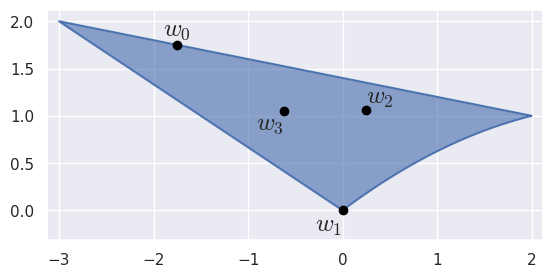
>>> nodes = np.asfortranarray([
...     [0.0, 1.0 , 2.0, -1.5, -0.5, -3.0],
...     [0.0, 0.75, 1.0,  1.0,  1.5,  2.0],
... ])
>>> triangle = bezier.Triangle(nodes, degree=2)
>>> triangle
<Triangle (degree=2, dimension=2)>
>>> param_vals = np.asfortranarray([
...     [0.   , 0.25, 0.75 ],
...     [1.   , 0.  , 0.   ],
...     [0.25 , 0.5 , 0.25 ],
...     [0.375, 0.25, 0.375],
... ])
>>> points = triangle.evaluate_barycentric_multi(param_vals)
>>> points
array([[-1.75 , 0. , 0.25   , -0.625   ],
       [ 1.75 , 0. , 1.0625 ,  1.046875]])
- Parameters:
param_vals (numpy.ndarray) – Array of parameter values (as a
N x 3array).verify (
Optionalbool) – Indicates if the coordinates should be verified. Seeevaluate_barycentric(). Defaults toTrue. Will also double check thatparam_valsis the right shape.
- Returns:
The points on the triangle.
- Return type:
- Raises:
ValueError – If
param_valsis not a 2D array andverify=True.
- evaluate_cartesian(s, t, verify=True)
Compute a point on the triangle.
Evaluates \(B\left(1 - s - t, s, t\right)\) by calling
evaluate_barycentric():This method acts as a (partial) inverse to
locate().>>> nodes = np.asfortranarray([ ... [0.0, 0.5, 1.0 , 0.0, 0.5, 0.25], ... [0.0, 0.5, 0.625, 0.5, 0.5, 1.0 ], ... ]) >>> triangle = bezier.Triangle(nodes, degree=2) >>> point = triangle.evaluate_cartesian(0.125, 0.375) >>> point array([[0.16015625], [0.44726562]]) >>> triangle.evaluate_barycentric(0.5, 0.125, 0.375) array([[0.16015625], [0.44726562]])
- Parameters:
- Returns:
The point on the triangle (as a two dimensional NumPy array).
- Return type:
- evaluate_cartesian_multi(param_vals, verify=True)
Compute multiple points on the triangle.
Assumes
param_valshas two columns of Cartesian coordinates. Seeevaluate_cartesian()for more details on how each row of parameter values is evaluated.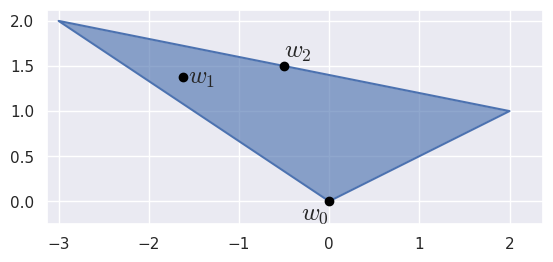
>>> nodes = np.asfortranarray([
...     [0.0, 2.0, -3.0],
...     [0.0, 1.0,  2.0],
... ])
>>> triangle = bezier.Triangle(nodes, degree=1)
>>> triangle
<Triangle (degree=1, dimension=2)>
>>> param_vals = np.asfortranarray([
...     [0.0  , 0.0  ],
...     [0.125, 0.625],
...     [0.5  , 0.5  ],
... ])
>>> points = triangle.evaluate_cartesian_multi(param_vals)
>>> points
array([[ 0. , -1.625, -0.5 ],
       [ 0. ,  1.375,  1.5 ]])
- Parameters:
param_vals (numpy.ndarray) – Array of parameter values (as a
N x 2array).verify (
Optionalbool) – Indicates if the coordinates should be verified. Seeevaluate_cartesian(). Defaults toTrue. Will also double check thatparam_valsis the right shape.
- Returns:
The points on the triangle.
- Return type:
- Raises:
ValueError – If
param_valsis not a 2D array andverify=True.
- plot(pts_per_edge, color=None, ax=None, with_nodes=False, alpha=0.625)
Plot the current triangle.
- Parameters:
pts_per_edge (int) – Number of points to plot per edge.
color (
OptionalTuplefloat,float,float) – Color as RGB profile.ax (
Optionalmatplotlib.artist.Artist) – matplotlib axis object to add plot to.with_nodes (
Optionalbool) – Determines if the control points should be added to the plot. Off by default.alpha (
Optionalfloat) – Alpha value of patch center, between 0 and 1 inclusive.
- Returns:
The axis containing the plot. This may be a newly created axis.
- Return type:
- Raises:
NotImplementedError – If the triangle’s dimension is not
2.
- subdivide()
Split the triangle into four sub-triangles.
Does so by taking the unit triangle (i.e. the domain of the triangle) and splitting it into four sub-triangles
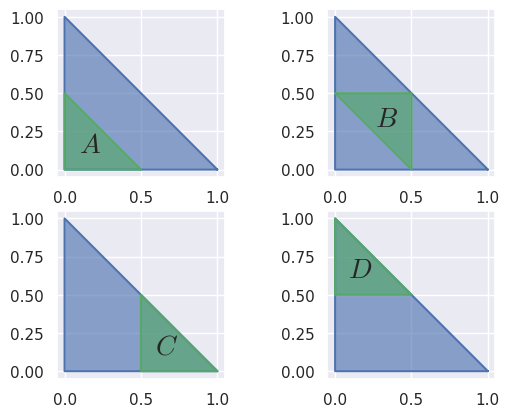
Then the triangle is re-parameterized via the map to / from the given sub-triangles and the unit triangle.
For example, when a degree two triangle is subdivided:
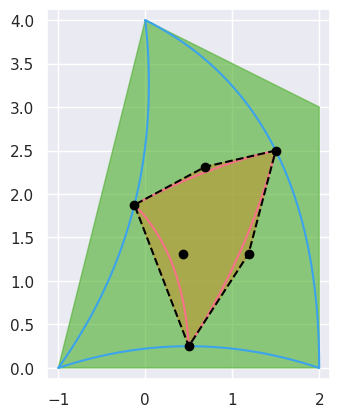
>>> nodes = np.asfortranarray([
...     [-1.0, 0.5, 2.0, 0.25, 2.0, 0.0],
...     [ 0.0, 0.5, 0.0, 1.75, 3.0, 4.0],
... ])
>>> triangle = bezier.Triangle(nodes, degree=2)
>>> _, sub_triangle_b, _, _ = triangle.subdivide()
>>> sub_triangle_b
<Triangle (degree=2, dimension=2)>
>>> sub_triangle_b.nodes
array([[ 1.5 ,  0.6875, -0.125 , 1.1875, 0.4375, 0.5  ],
       [ 2.5 ,  2.3125,  1.875 , 1.3125, 1.3125, 0.25 ]])
- property is_valid
Flag indicating if the triangle is “valid”.
Here, “valid” means there are no self-intersections or singularities and the edges are oriented with the interior (i.e. a 90 degree rotation of the tangent vector to the left is the interior).
This checks if the Jacobian of the map from the reference triangle is everywhere positive. For example, a linear “triangle” with collinear points is invalid:
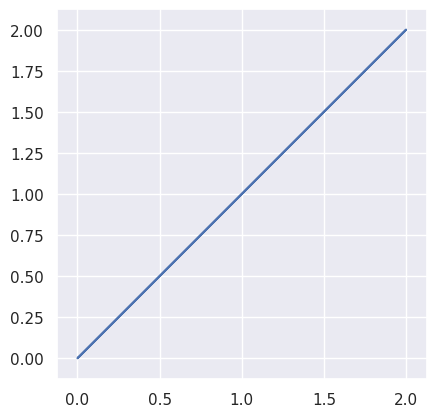
>>> nodes = np.asfortranarray([
...     [0.0, 1.0, 2.0],
...     [0.0, 1.0, 2.0],
... ])
>>> triangle = bezier.Triangle(nodes, degree=1)
>>> bool(triangle.is_valid)
False
while a quadratic triangle with one straight side:
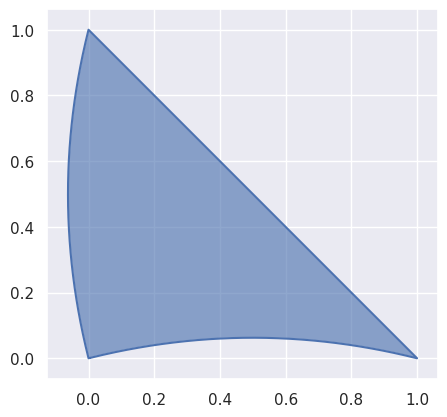
>>> nodes = np.asfortranarray([
...     [0.0, 0.5  , 1.0, -0.125, 0.5, 0.0],
...     [0.0, 0.125, 0.0,  0.5  , 0.5, 1.0],
... ])
>>> triangle = bezier.Triangle(nodes, degree=2)
>>> bool(triangle.is_valid)
True
though not all higher degree triangles are valid:
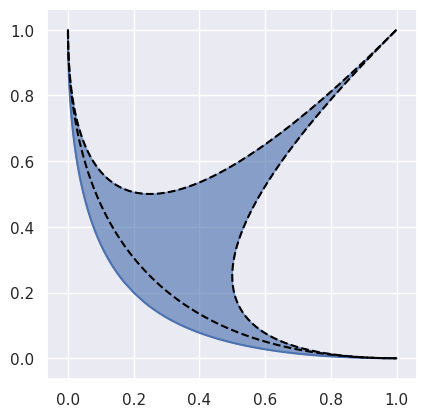
>>> nodes = np.asfortranarray([
...     [1.0, 0.0, 1.0, 0.0, 0.0, 0.0],
...     [0.0, 0.0, 1.0, 0.0, 0.0, 1.0],
... ])
>>> triangle = bezier.Triangle(nodes, degree=2)
>>> triangle.is_valid
False
- Type:
- locate(point, verify=True)
Find a point on the current triangle.
Solves for \(s\) and \(t\) in \(B(s, t) = p\).
This method acts as a (partial) inverse to
evaluate_cartesian().Warning
A unique solution is only guaranteed if the current triangle is valid. This code assumes a valid triangle, but doesn’t check.
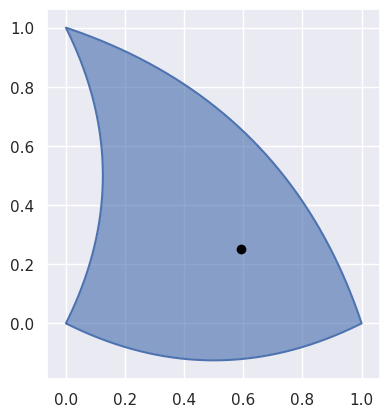
>>> nodes = np.asfortranarray([
...     [0.0,  0.5 , 1.0, 0.25, 0.75, 0.0],
...     [0.0, -0.25, 0.0, 0.5 , 0.75, 1.0],
... ])
>>> triangle = bezier.Triangle(nodes, degree=2)
>>> point = np.asfortranarray([
...     [0.59375],
...     [0.25   ],
... ])
>>> s, t = triangle.locate(point)
>>> s
0.5
>>> t
0.25
- Parameters:
point (numpy.ndarray) – A (
D x 1) point on the triangle, where \(D\) is the dimension of the triangle.verify (
Optionalbool) – Indicates if extra caution should be used to verify assumptions about the inputs. Can be disabled to speed up execution time. Defaults toTrue.
- Returns:
The \(s\) and \(t\) values corresponding to
pointorNoneif the point is not on the triangle.- Return type:
- Raises:
NotImplementedError – If the triangle isn’t in \(\mathbf{R}^2\).
ValueError – If the dimension of the
pointdoesn’t match the dimension of the current triangle.
- intersect(other, strategy=IntersectionStrategy.GEOMETRIC, verify=True)
Find the common intersection with another triangle.
- Parameters:
other (Triangle) – Other triangle to intersect with.
strategy (
OptionalIntersectionStrategy) – The intersection algorithm to use. Defaults to geometric.verify (
Optionalbool) – Indicates if extra caution should be used to verify assumptions about the algorithm as it proceeds. Can be disabled to speed up execution time. Defaults toTrue.
- Returns:
List of intersections (possibly empty).
- Return type:
- Raises:
TypeError – If
otheris not a triangle (andverify=True).NotImplementedError – If at least one of the triangles isn’t two-dimensional (and
verify=True).ValueError – If
strategyis not a validIntersectionStrategy.
- elevate()
Return a degree-elevated version of the current triangle.
Does this by converting the current nodes \(\left\{v_{i, j, k}\right\}_{i + j + k = d}\) to new nodes \(\left\{w_{i, j, k}\right\}_{i + j + k = d + 1}\). Does so by re-writing
\[E\left(\lambda_1, \lambda_2, \lambda_3\right) = \left(\lambda_1 + \lambda_2 + \lambda_3\right) B\left(\lambda_1, \lambda_2, \lambda_3\right) = \sum_{i + j + k = d + 1} \binom{d + 1}{i \, j \, k} \lambda_1^i \lambda_2^j \lambda_3^k \cdot w_{i, j, k}\]In this form, we must have
\[\begin{split}\begin{align*} \binom{d + 1}{i \, j \, k} \cdot w_{i, j, k} &= \binom{d}{i - 1 \, j \, k} \cdot v_{i - 1, j, k} + \binom{d}{i \, j - 1 \, k} \cdot v_{i, j - 1, k} + \binom{d}{i \, j \, k - 1} \cdot v_{i, j, k - 1} \\ \Longleftrightarrow (d + 1) \cdot w_{i, j, k} &= i \cdot v_{i - 1, j, k} + j \cdot v_{i, j - 1, k} + k \cdot v_{i, j, k - 1} \end{align*}\end{split}\]where we define, for example, \(v_{i, j, k - 1} = 0\) if \(k = 0\).
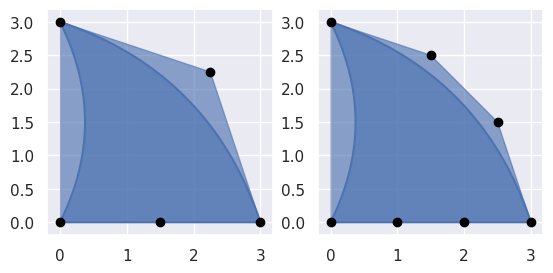
>>> nodes = np.asfortranarray([
...     [0.0, 1.5, 3.0, 0.75, 2.25, 0.0],
...     [0.0, 0.0, 0.0, 1.5 , 2.25, 3.0],
... ])
>>> triangle = bezier.Triangle(nodes, degree=2)
>>> elevated = triangle.elevate()
>>> elevated
<Triangle (degree=3, dimension=2)>
>>> elevated.nodes
array([[0. , 1. , 2. , 3. , 0.5 , 1.5 , 2.5 , 0.5 , 1.5 , 0. ],
       [0. , 0. , 0. , 0. , 1.  , 1.25, 1.5 , 2.  , 2.5 , 3. ]])
- Returns:
The degree-elevated triangle.
- Return type:
- to_symbolic()
Convert to a SymPy matrix representing \(B(s, t)\).
Note
This method requires SymPy.
>>> nodes = np.asfortranarray([
...     [0.0, 0.5, 1.0, -0.5, 0.0, -1.0],
...     [0.0, 0.0, 1.0,  0.0, 0.0,  0.0],
...     [0.0, 0.0, 0.0,  0.0, 0.0,  1.0],
... ])
>>> triangle = bezier.Triangle(nodes, degree=2)
>>> triangle.to_symbolic()
Matrix([
[s - t],
[ s**2],
[ t**2]])
- Returns:
The triangle \(B(s, t)\).
- Return type:
- implicitize()
Implicitize the triangle.
Note
This method requires SymPy.
>>> nodes = np.asfortranarray([
...     [0.0, 0.5, 1.0, -0.5, 0.0, -1.0],
...     [0.0, 0.0, 1.0,  0.0, 0.0,  0.0],
...     [0.0, 0.0, 0.0,  0.0, 0.0,  1.0],
... ])
>>> triangle = bezier.Triangle(nodes, degree=2)
>>> triangle.implicitize()
(x**4 - 2*x**2*y - 2*x**2*z + y**2 - 2*y*z + z**2)**2
- Returns:
The function that defines the triangle in \(\mathbf{R}^3\) via \(f(x, y, z) = 0\).
- Return type:
- Raises:
ValueError – If the triangle’s dimension is not
3.
- property dimension
The dimension that the shape lives in.
For example, if the shape lives in \(\mathbf{R}^3\), then the dimension is
3.- Type:
- property nodes
The nodes that define the current shape.
- Type: